The easiest way to convert MXF files

MXF Converter is a helpful application developed by Amazing-Share that will allow you to convert all your MXF file into any video format. Just simply import your files and choose which format you want to convert it into.  

Top Recommended Alternative

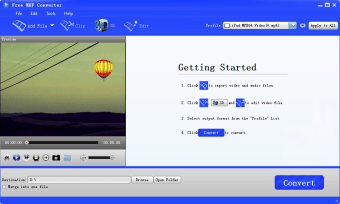
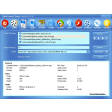
Converting your files will only take a few minutes. After importing your MXF, you will be able to see it on the preview screen on the left side of the application. You can then select what file format you would like to change the MXF into and all your choices are located at the top right of the application’s window. What’s good about MXF Converter is that despite its seemingly old look, it actually has a lot of video formats to choose from like MP4 and MKV. As an added bonus, you can also do basic editing on your video like trimming it before finally converting it to the video format you want. If you are worried about taking too much time during the converting process, rest assured that it will not take long at all. You will have your converted MXF files in just a few minutes.

  • Pros

    • Easy to install
    • Easy to use
    • Videos can be previewed
    • Lots of video formats available
  • Cons

    • Old-school interface
    • Few video editing options
    • Not appealing
 0/1

App specs

Program available in other languages


User reviews about Free MXF Converter

4.4

1 reviews

Add review

Main reviews for you

  • Anonymous user

    Best Software to Convert MXF Files. I'm using the latest version 9.9.9 now. The official site released the new version. Amazing Free MXF Converter is specially developed for camcorders that use Material exchange Format (MXF), such as the Panasonic P2, and Canon XF. It is the perfect solution to change MXF file into other popular video formats supported by some video editing software, such as Sony Vegas, Adobe Premiere, Windows Movie Maker, Avid, and so on. Pros: Convert MXF to MOV (QuickTime) and others quickly and easily

More

You may also like

Alternatives to Free MXF Converter

Explore Apps

Latest articles

Laws concerning the use of this software vary from country to country. We do not encourage or condone the use of this program if it is in violation of these laws.

Softonic

Is Free MXF Converter safe?

100/100

Score result: Clean

This file passed a comprehensive security scan using VirusTotal technology. It is safe to download.

  • Virus free
  • Spyware free
  • Malware free
  • Verified by Security Partners

    VirusTotal logo

Scan Info

Last scan
Friday, January 5, 2024
Scan provider
VirusTotal · Full report

File Integrity

File
free_mxf_converter.exe
SHA256
5323e6a86d30821df3f885d5f311a07ca7149a39b3d67115dad9f2798509d027
SHA1
a1154ad17ce174ebb6f9a424d61ffcdabed885b9

Softonic security commitment

Free MXF Converter has been thoroughly scanned by our advanced security systems and verified by industry-leading partners. This file comes from the official developer and has passed all our security checks, showing no signs of viruses, malware, or spyware. For more information, visit our Security and Trust Center